Cursor AI Powered IDE: Evaluate the Full AI Coding Workflow
Evaluate a cursor ai powered ide across context, coding, review, debugging, and handoff, then see when visual orchestration fits.
On this page
- What an AI-powered IDE must handle beyond code generation
- Context: how Cursor understands a project before it writes
- Generation: where a code editor becomes an agent interface
- Review: can developers see and control what the AI changed?
- Debugging: from an error message to a reliable fix
- Handoff: choosing between Cursor and visual multi-agent orchestration
- Frequently Asked Questions
- Continue this guide
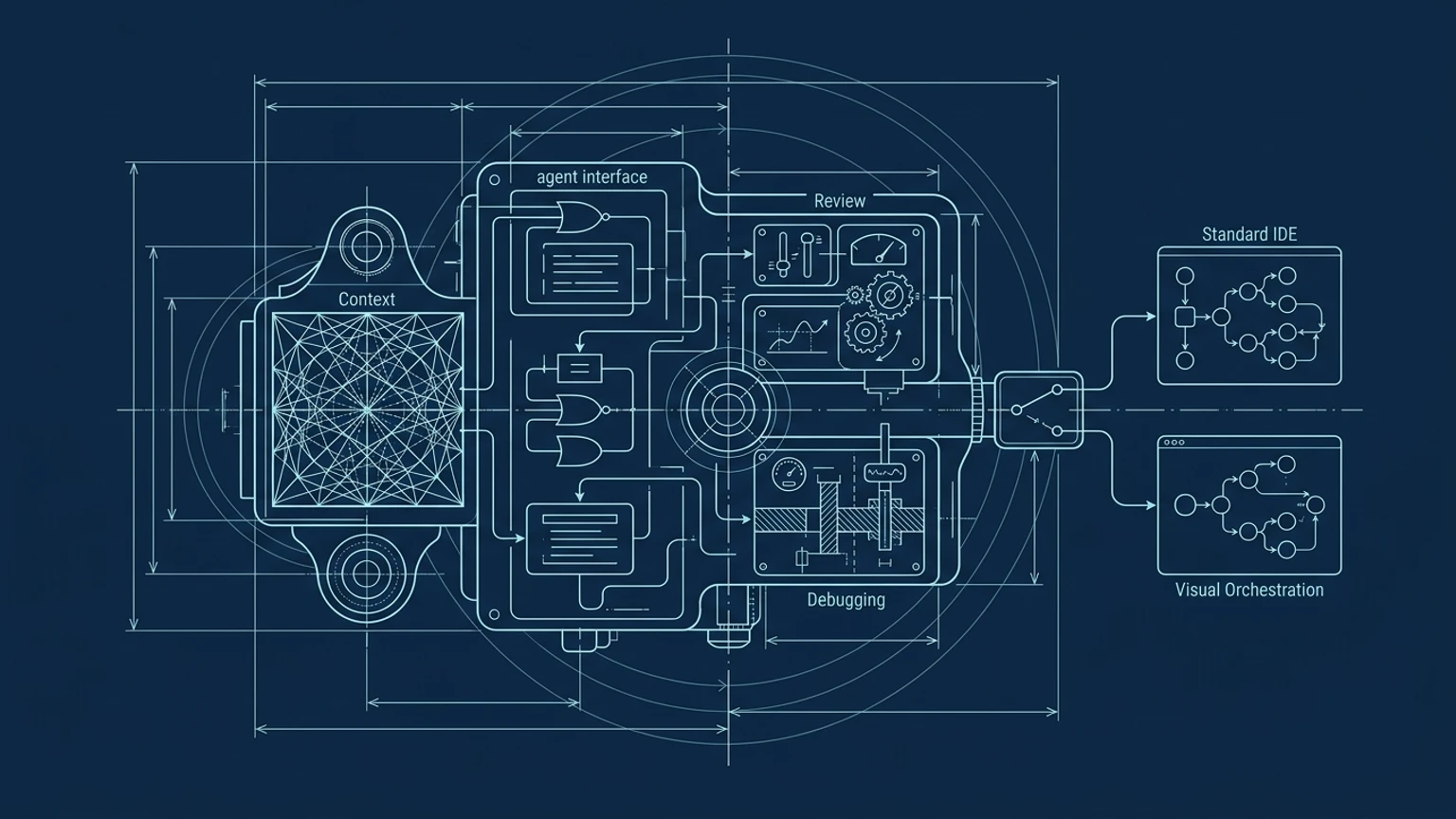
A Cursor AI-powered IDE is a strong option for repository-level coding, especially when a developer needs project context, inline editing, planning, diffs, tests, and agent-assisted changes in one workspace. The buying decision depends on the full workflow, though: context, generation, review, debugging, and handoff all determine whether faster code production remains understandable and controllable.
What an AI-powered IDE must handle beyond code generation
The wrong default is choosing the tool that produces the most code or launches the most agents. An AI coding workflow earns trust when a developer can explain what context informed a change, inspect what was written, reproduce the fix, and hand the work to another person or process without losing the thread.
That makes the evaluation practical:
| Workflow stage | Evidence to inspect in a repository trial | Decision question |
|---|---|---|
| Context | Search results, selected files, project rules, and tool boundaries | Can the developer see what evidence informed the change? |
| Generation | Completion, inline editing, or an editable plan | Is the interaction proportional to the task? |
| Review | Diffs, revert controls, tests, lint results, and history | Can the developer verify behavior before integration? |
| Debugging | Reproduction steps, logs, proposed cause, changed code, and rerun checks | Does the fix address observed behavior? |
| Handoff | Branches, pull requests, notes, artifacts, and runtime evidence | Can someone else continue without reconstructing the workflow? |
Cursor is an AI-powered development environment that covers these stages through an editor-centered workflow. Its strength is the tight connection between repository files, natural-language instructions, generated changes, and source control. The larger question is whether that text-and-file model remains sufficient when work expands across agents, tools, repositories, and runtime environments.
Developers comparing options should also review how to evaluate agentic coding tools, then decide whether they need an AI editor, a coding agent, or a broader orchestration layer.
Context: how Cursor understands a project before it writes
Cursor can draw on a project folder, repository files, code search, selected file mentions, project rules, documentation, images, PDFs, web resources, and connected tools. Its documentation describes Agent search through grep and local Instant Grep indexing, while project rules can live in version-controlled .cursor/rules files with path-based scope. These controls give developers several ways to put relevant evidence in front of the model before generation begins.
The practical insight is simple: better context usually produces a more useful starting point. A developer working on an authentication change, for example, should provide the route, session model, relevant tests, project rules, and any external API documentation. A prompt that says “add login” leaves too many decisions unstated.
The cost appears as the repository grows. Someone still needs to identify which files matter, maintain rules, check ignored-file behavior, and understand what terminal or MCP tools can access. Cursor documents that ignored files are blocked from Agent, while terminal commands and MCP tools operate outside those file-access controls. That distinction belongs in every repository trial.
A solo founder’s guide to multi-agent development helps frame the next question: is the developer managing context inside one editor, or coordinating context across several active workers? October’s spatial approach is aimed at the second problem, showing agents, tools, dependencies, and workflow state together instead of requiring the developer to reconstruct that picture from separate conversations and files.
Generation: where a code editor becomes an agent interface
Cursor offers several generation surfaces for different levels of intent. Tab provides AI autocomplete based on recent edits, surrounding code, and linter errors. Inline Edit applies a described change directly to selected code. Chat supports conversational exploration, while Agent and Composer-style workflows can plan or modify several files for a broader task.
That range matters because a small change should not require a repository-wide delegation loop. Use completion for predictable continuation, inline editing for a contained refactor, and an editable plan before a feature touches multiple modules. Cursor’s Plan Mode researches the codebase, asks clarifying questions, and creates a plan that the developer can inspect before building.
The human still needs a product or interface vision before prompting. Tech With Tim makes this point in Cursor Tutorial for Beginners: writing notes or sketching the intended interface gives the coding agent a clearer target. A prompt cannot supply decisions that the builder has not made.
For scaffolding, prototypes, and well-defined feature work, a Cursor AI-powered IDE can shorten the path from intent to working code. The limitation appears when the task is better expressed as a system of specialized workers. A visual workflow for building with multiple agents treats planning, implementation, research, testing, and review as connected roles. October fits builders who need to compose and coordinate those roles rather than keep every decision inside one conversational coding loop.
Review: can developers see and control what the AI changed?
Review begins with visibility. Cursor’s diff view shows changes as an agent works, and developers can stop the agent, revert changes, refine a plan, run Agent Review, compare local changes with the main branch, and execute tests or linting. These are useful controls because the developer reviews saved code in its repository context instead of copying an answer from a chat window and hoping nothing was lost.
Tech With Tim describes the difference in Cursor Tutorial for Beginners: applying a response creates a visible diff inside the file, which makes the proposed edit easier to inspect than manually copying code from a separate conversation. That inspectability affects trust, debugging, and future maintenance.
A good review sequence is concrete:
- Read the plan or task statement.
- Inspect the changed files and diff.
- Check permissions, terminal commands, and generated configuration changes.
- Run focused tests, then broader checks where the change warrants them.
- Compare the final branch with the intended behavior.
- Record unresolved risks before handoff.
October adds a spatial inspection model for agent work, allowing builders to see agents and relationships as part of a broader workflow. That can clarify which worker produced a result and where a handoff sits. It does not remove code review. Visual orchestration improves the map of the work; tests, diffs, logs, and human judgment still establish whether the result is safe to integrate.
Debugging: from an error message to a reliable fix
An AI IDE supports debugging when it can connect an error to the relevant codebase context, terminal output, documentation, runtime behavior, and an iterative repair loop. Cursor’s workflow can search the repository, inspect files, propose a change, run commands with approval, and refine the result through additional prompts. Its documentation also describes cloud agents that can build, test, work in separate branches, and return logs or other artifacts for inspection.
Diagnosis and execution remain separate jobs. An agent can produce a convincing explanation for a failing test while missing a race condition, a data dependency, or a regression in another path. The developer should reproduce the failure, capture the relevant output, identify the proposed cause, inspect the exact change, rerun the failing case, and check nearby behavior. If the explanation changes while the evidence stays the same, stop and revise the plan.
A reliable manual workflow looks like this:
- Save the failing command and exact output.
- Reduce the failure to a repeatable case.
- Locate the responsible code and its callers.
- Ask the agent for competing explanations, not one confident answer.
- Apply the smallest testable change.
- Rerun the reproduction and regression checks.
- Preserve a rollback path through version control.
This is where workflow engine runtime design becomes relevant. October is suited to workflows where several agents can investigate, test, or diagnose in parallel and where their status and handoffs need to stay visible. The stop condition is clear: never accept a debugging result solely because the agent sounds certain.
Handoff: choosing between Cursor and visual multi-agent orchestration
The right tool depends on where the bottleneck sits. Cursor is strongest when one developer needs fast repository-level coding inside a VS Code-based environment. Visual Studio Code now supports agent workflows that find code, edit across files and tools, run checks, and save work in a session folder or worktree. Claude Code can work through command-line tools and integrates with environments including VS Code and Cursor. AO Agents focuses on supervising coding agents through durable activity and pull-request facts. Superset separates agents into Git worktrees and branches while providing monitoring, review, and merge controls. Langflow provides a visual editor for building and testing AI application workflows, although that role differs from a repository coding environment.
| Tool or approach | Primary role | What to evaluate | When it fits |
|---|---|---|---|
| Cursor AI IDE | Repository editing and agent-assisted coding | Context quality, extension needs, permissions, review, and debugging | One developer wants an integrated coding loop |
| Visual Studio Code | Extensible editor with configurable agents | Existing extensions, selected agent harness, and review flow | The current editor already supports the needed workflow |
| Claude Code | Coding agent with terminal and IDE integrations | Command access, tests, pull requests, and how it complements an editor | A developer prefers agent execution across command-line tools |
| AO Agents or Superset | Agent supervision and worktree coordination | Status evidence, branch isolation, review, and merge handling | Several coding agents need centralized oversight |
| October | Visual, spatial orchestration and runtime work | Agent relationships, tool coordination, state visibility, and handoffs | Solo founders or small teams coordinate evolving multi-agent workflows |
The decision rule is straightforward. Choose a text-centric AI IDE when one developer needs repository context, targeted edits, planned changes, and a familiar review process. Consider October when the hard part becomes coordinating multiple agents, tools, repositories, or runtime tasks while keeping the whole system visible.
October is not a universal replacement for Cursor. Its desktop IDE and runtime approach targets the visibility and orchestration gap that appears after one-agent coding stops being enough. The product is most relevant when the developer is tired of acting as the manual context layer between separate agents and needs a spatial way to inspect how work moves from plan to execution to review.
For a broader comparison of tools for small teams, see the best AI coding tools for solo founders. The practical test is not which tool claims the most autonomy. It is whether the tool leaves behind enough context, evidence, and ownership for the next step to be safe.
Developers who want to test that distinction can use October to make agent relationships, runtime activity, and handoffs visible in one workspace. Get Started
View this post on Instagram
Frequently Asked Questions
Is Cursor.AI a good tool for coding?
Cursor is a credible coding option with documented repository search, autocomplete, inline editing, planning, review, debugging, worktrees, and agent execution. Whether it is good for a particular developer depends on the repository, extension requirements, permission model, and review process. A repository-specific trial is more useful than assuming universal productivity gains.
What is the best AI software for writing code?
There is no universal winner established by the evidence in this comparison. Choose based on the task, repository context, extension needs, permission boundaries, review quality, debugging evidence, and coordination requirements. A Cursor AI-powered IDE fits integrated repository work, while a visual orchestration tool fits workflows that span several agents and tools.
Who has built Cursor AI?
Cursor is the AI coding product offered by Anysphere, Inc. A company-provider profile lists Michael Truell, Sualeh Asif, and Aman Sanger among its cofounders, but that source does not establish a complete founder roster or full corporate history. The attribution should therefore be treated as qualified rather than exhaustive.
Should I use Cursor or VS Code?
Use Cursor when its integrated AI editing and agent workflow matches the repository and review process. Use Visual Studio Code when its existing extensions and selected agent configuration already provide the context, editing, testing, and handoff controls the team needs. Since Cursor is based on the VS Code codebase but uses the Open VSX extension registry, extension compatibility should be tested individually rather than assumed.